codex-lv3-may-2025
| Level Navigation: 1 | 2 | 3 | 4 | 5 | 6 | 7 | 8 | 9 | 10 | 11 | 12 | 13 | 14 | 15 | 16 | 17 | 18 | 19⚡ | 20 |
Level 3: Database Setup
Goal: Configure your Supabase database with tables and security policies.
User Story: As a developer, I want to set up my database tables and security policies so that I can store and retrieve potluck data securely.
What You’ll Do
Follow the Supabase setup guides to create your database tables and configure access policies.
Instructions
- Complete the Supabase Setup Guide to create your account and project
- Create a
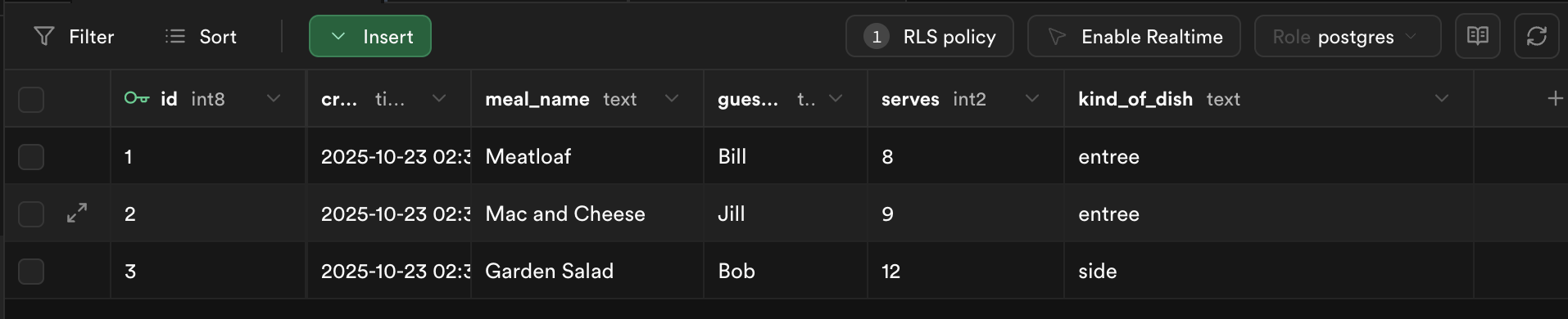
potluck_mealstable with these columns:meal_name(text)guest_name(text)serves(integer)kind_of_dish(text)
- Add at least 3 sample meals
- Set up read policies and insert policies for public access
- Follow the Supabase React Setup Guide to configure environment variables
- Remember to:
- install your libraries. (supabase and tslib) instructions
- create your
.env.localfile in your project’s root directory instructions - create your supabase utility file in
src/utilNote: do not copy the code forApp.jsxfor this project. We will put the code into a component in later steps instructions
- Remember to:
⚠️ Important Note: Do NOT use the starter code for App.jsx from the Supabase setup guide. That code puts everything in one file, but we’ll be organizing our app into separate components. Follow the component structure outlined in Levels 4-6 below instead.
Show Me: Sample data in database
🔍 Diving Deeper
What are Row Level Security (RLS) policies?
- Purpose: Control who can access which rows in your database
- Security layer: Prevents unauthorized access to your data
- Policy types: SELECT (read), INSERT (create), UPDATE (modify), DELETE (remove)
- Why we need them: Without RLS, anyone with your database URL could access all your data
Understanding our policies:
-- Read policy: Allow everyone to read meals
CREATE POLICY "Enable read access for all users" ON potluck_meals
FOR SELECT USING (true);

-- Insert policy: Allow everyone to add meals
CREATE POLICY "Enable insert for all users" ON potluck_meals
FOR INSERT WITH CHECK (true);
USING (true): For SELECT policies, means “allow if condition is true” (always true = everyone can read)WITH CHECK (true): For INSERT policies, means “allow if condition is true” (always true = everyone can insert)true: Always evaluates to true, so these policies allow public access
Environment variables explained:
VITE_SUPABASE_URL=https://your-project.supabase.co
VITE_SUPABASE_ANON_KEY=your-anon-key-here
VITE_prefix: Required for Vite to include these variables in your build.env.local: More secure than.env(automatically ignored by git)- Anon key: Safe to use in frontend code (has limited permissions)
- Service key: Never use in frontend (has full database access)
📺 Learn More:
- RLS Policy (Row-Level Security) - Quick explanation of RLS
- Environment Variables - How environment variables work in Vite
- Supabase in 100 Seconds - Overview of Supabase platform
✅ Check
- Your Supabase project is created and accessible
- The
potluck_mealstable exists with the correct columns - You have sample data in your table
- RLS policies are enabled and configured
- Environment variables are set up in your React project
- You can see your data in the Supabase dashboard
📚 Vocabulary
- Database (DB) - A structured place to store and organize data
- Supabase - Backend-as-a-service with PostgreSQL database
- RLS Policy - Rules controlling database access
- Environment Variables - Hidden configuration values
- Snake Case - Naming style with underscores