codex-lv3-may-2025
| Level Navigation: 1 | 2 | 3 | 4 | 5 | 6 | 7 | 8 | 9 | 10 | 11 | 12 | 13 | 14 | 15 | 16 | 17 | 18 | 19⚡ | 20 |
Level 7: Display Data with For Loop
Goal: Display the fetched meals using a for loop.
User Story: As a user, I want to see the meals displayed on the page so that I can view what’s planned for the potluck.
What You’ll Do
Add display logic using a for loop to render each meal in the list.
Instructions
- Create a
mealsDisplayarray - Use a for loop to iterate through the meals array
- For each meal, push a
<li>element with the meal information - Include the meal name, guest name, serves count, and dish type
- Display the meals using
{mealsDisplay}in the JSX
💡 Code Hints
Need help with the display loop? Check out these snippets:
Show Me: display loop
const mealsDisplay = []
for (let i = 0; i < meals.length; i++) {
    mealsDisplay.push(
        <li key={meals[i].id}>
            {meals[i].meal_name} by {meals[i].guest_name} serves {meals[i].serves} ( {meals[i].kind_of_dish} )
        </li>
    )
}
Show Me: displaying the meals
<ul>
    {mealsDisplay}
</ul>
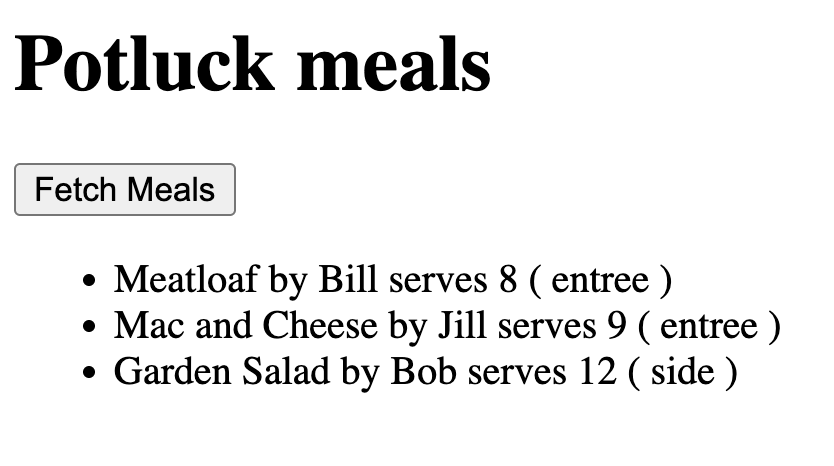
Show Me: Meals displayed in app
🔍 Diving Deeper
Why do we need the key prop?
- React requirement: When rendering lists, React needs a unique identifier for each item
- Performance: Helps React efficiently update the DOM when the list changes
- Best practice: Use a unique, stable identifier (like
id) rather than array index - What happens without it: React will show warnings and may not update efficiently
Understanding JSX in loops:
mealsDisplay.push(
    <li key={meals[i].id}>
        {meals[i].meal_name} by {meals[i].guest_name} serves {meals[i].serves} ( {meals[i].kind_of_dish} )
    </li>
)
- JSX elements: We’re creating React elements (not HTML strings)
- Template literals: Using
{variable}to insert JavaScript values into JSX - Array building: We build an array of JSX elements, then render it all at once
Alternative approaches:
You could also use .map() instead of a for loop:
const mealsDisplay = meals.map(meal => (
    <li key={meal.id}>
        {meal.meal_name} by {meal.guest_name} serves {meal.serves} ({meal.kind_of_dish})
    </li>
));
📺 Learn More:
- JavaScript Modules in 100 Seconds - Understanding modules and imports
- Arrow Functions - Beau teaches JavaScript - Modern JavaScript function syntax
✅ Check
- Click the “Fetch Meals” button
- Your meals should appear in a list below the button
- Each meal shows: name, guest, serves count, and dish type
- The list updates when you click the button again
- If no data appears, check your Supabase connection and RLS policies
📚 Vocabulary
- List Scrolling Pattern - Iterating through a list to process each item
- JSX - Special syntax used in React that looks like HTML
- Template Literal - Way to put variables into strings using backticks
- Array Literal - Syntax to create an array using square brackets
- Index - Number that tells you an item’s position in a list