| Level Navigation: 1 | 2 | 3 | 4 | 5 | 6 | 7 | 8 | 9 | 10 | 11 | 12 | 13 | 14 | Current Level: 15 | 16 | 17 | 18 | 19 | 20 | 21 | 22 | 23 | 24 | 25 | 26 | 27 | 28 | 29 | 30 | 31 | 32 |
Connect your function to the Hugging Face API.
This lesson involves working with APIs and can be challenging. If you get stuck or encounter errors, don’t worry - this is normal!
Need help? Use our Help Seeking Form to get support from your instructors and classmates.
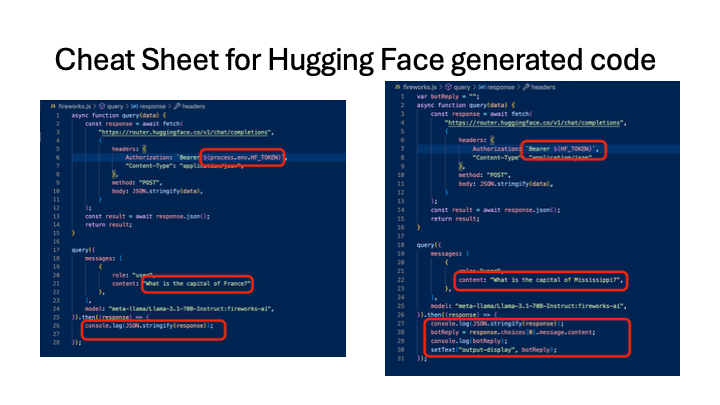
Paste the Hugging Face JavaScript fetch snippet into sendToModel. Replace the API token first.
Making API calls? You’ll need to use the fetch function to call the Hugging Face API. Check out the API Calls section in SNIPPETS.md for fetch examples and the OpenAI Response Format section for correct response handling.
Quick Reference: Check out the Hugging Face Gen Code Cheat Sheet for what you will need to change on your generated code.
sendToModel() and press Entersecret-variables.jsNext: Level 16 - Proof-of-Life Test
| Level Navigation: 1 | 2 | 3 | 4 | 5 | 6 | 7 | 8 | 9 | 10 | 11 | 12 | 13 | 14 | Current Level: 15 | 16 | 17 | 18 | 19 | 20 | 21 | 22 | 23 | 24 | 25 | 26 | 27 | 28 | 29 | 30 | 31 | 32 |